> For the complete documentation index, see [llms.txt](https://docs.glbnxt.com/llms.txt). Markdown versions of documentation pages are available by appending `.md` to page URLs; this page is available as [Markdown](https://docs.glbnxt.com/tutorials/guides/use-case-instructions/transcriber-workflow-n8n.md).
# TranscriberIQ - Transcribe Audio Files
### Introduction
This guide walks you through connecting any n8n AI workflow to a transcriber, so your team can transcribe their meetings or interviews into a file that summarizes the meeting and notes tasks, action points and speaker contributions like a real note taker. No coding experience is required - you will copy a ready-made script and adapt to your own favoured settings.
*Note that this is a Use Case Instruction, you can use this Use Case as an example to build your own custom Transcriber Workflow in n8n.*
***
### Steps
#### Step 1: Open the Workflow
1. On the [Use Cases Page](https://platform.glbnxt.com/sandbox) find the column **TranscriberIQ - Transcribe Audio Files**. Now, press the `Download` icon.
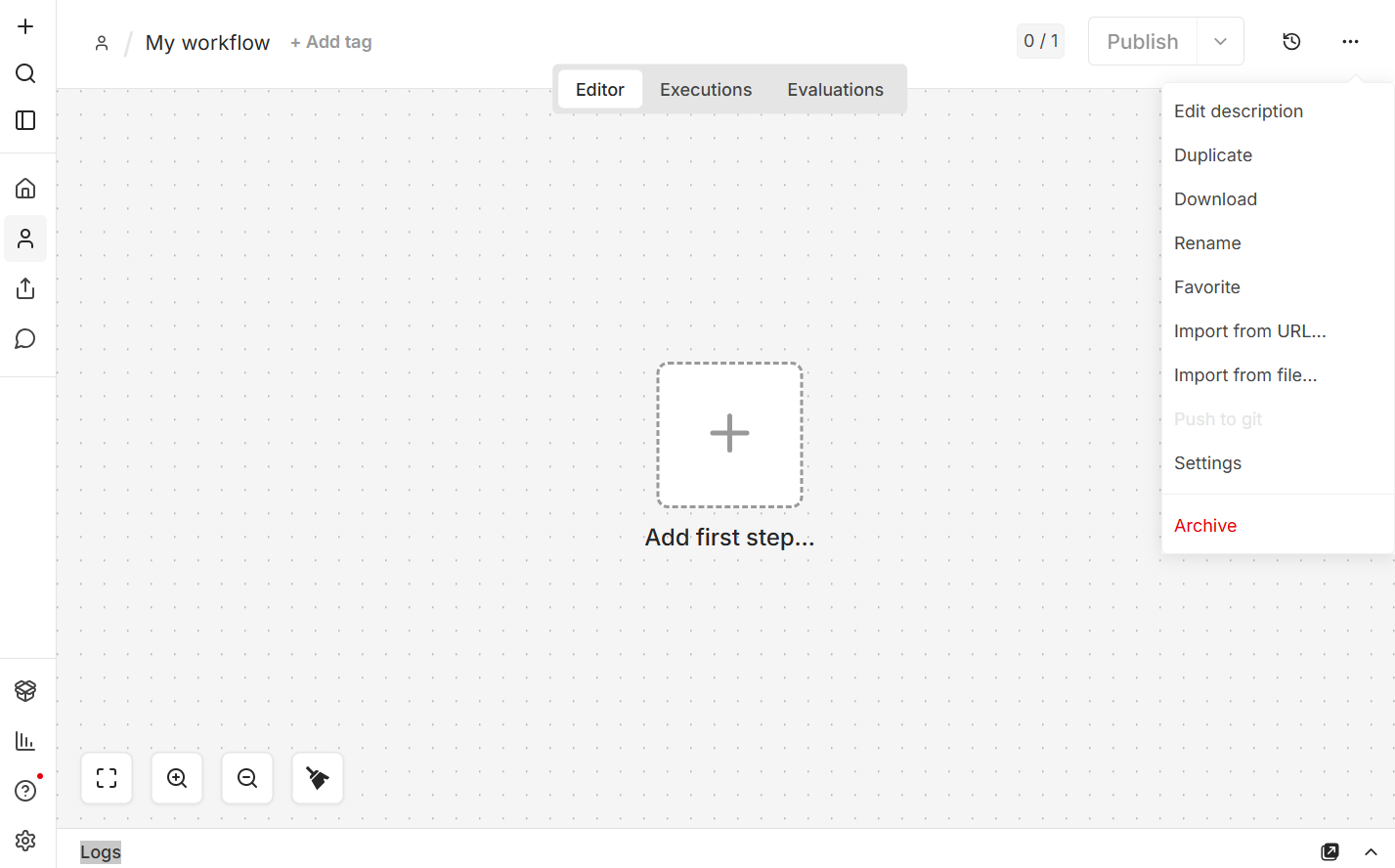
2. Open n8n in you [Dashboard](https://platform.glbnxt.com/) and create a workflow. Click on the three dots in the right corner of your screen and then on `Import from URL...`.
 3. Enter the URL in the pop-up that appears.
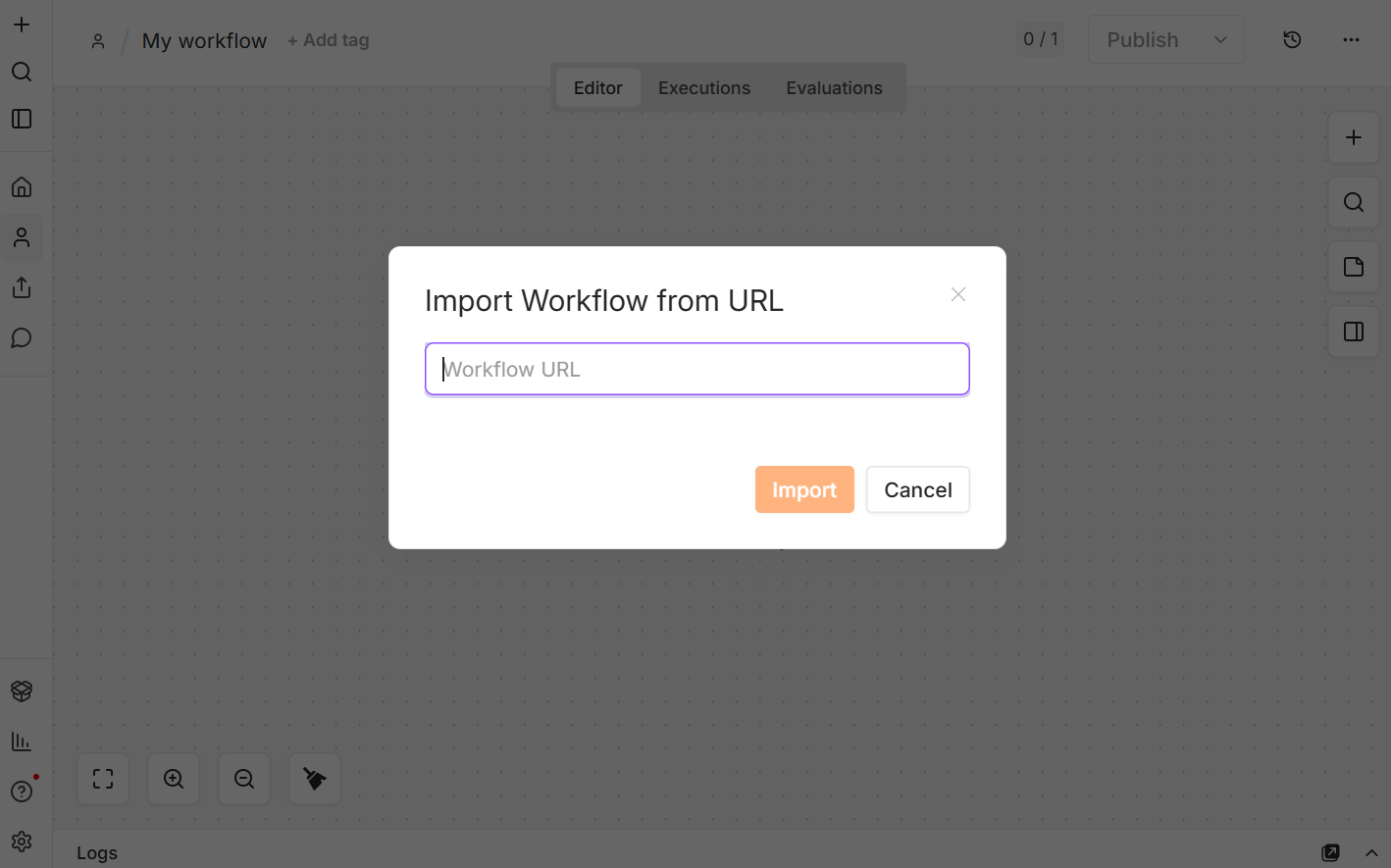 4. Click on `Import` and the Demo Workflow will appear on your page.
5. Follow the **Setup** in the Workflow.
***
#### Step 2: Adjust your parameters
After you have entered your credentials for MinIO, the transcription providers and the AI models, you can start using the demo.
All nodes have parameters, most are tailor-fit to the demo right now. There are some parameters that can be adjusted, below are examples:
* **Check File Size:** Increase the accepted file size to transcribe bigger / longer audio files.
* **AI Model:** Pick a `Model` and engineer your own `Prompt`
* **GLBNXT Transcriber:** Adjust the `Value` for the `Query Parameters`
* **OpenAI Transcriber:** Change the `Language of the Audio File`
* **Change Format:** Configure your layout in `JavaScript`
* **Convert to .txt:** Convert to other file types in `Operation`
Play around with all parameters to get the most out of your learning experience from this demo.
***
*Need help? Contact the GLBNXT support team or ask a GLBNXT agent to walk you through the setup.*
---
# Agent Instructions
This documentation is published with GitBook. GitBook is the documentation platform designed so that both humans and AI agents can read, navigate, and reason over technical content effectively. Learn more at gitbook.com.
## Querying This Documentation
If you need additional information that is not directly available in this page, you can query the documentation dynamically by asking a question.
Perform an HTTP GET request on the current page URL with the `ask` query parameter, and the optional `goal` query parameter:
```
GET https://docs.glbnxt.com/tutorials/guides/use-case-instructions/transcriber-workflow-n8n.md?ask=&goal=
```
`ask` is the immediate question: it should be specific, self-contained, and written in natural language.
`goal` is optional and describes the broader end goal you are ultimately trying to accomplish on behalf of the user. GitBook uses it to tailor the answer towards what is most useful for that goal.
The response will contain a direct answer to the question and relevant excerpts and sources from the documentation.
Use this mechanism when the answer is not explicitly present in the current page, you need clarification or additional context, or you want to retrieve related documentation sections.
4. Click on `Import` and the Demo Workflow will appear on your page.
5. Follow the **Setup** in the Workflow.
***
#### Step 2: Adjust your parameters
After you have entered your credentials for MinIO, the transcription providers and the AI models, you can start using the demo.
All nodes have parameters, most are tailor-fit to the demo right now. There are some parameters that can be adjusted, below are examples:
* **Check File Size:** Increase the accepted file size to transcribe bigger / longer audio files.
* **AI Model:** Pick a `Model` and engineer your own `Prompt`
* **GLBNXT Transcriber:** Adjust the `Value` for the `Query Parameters`
* **OpenAI Transcriber:** Change the `Language of the Audio File`
* **Change Format:** Configure your layout in `JavaScript`
* **Convert to .txt:** Convert to other file types in `Operation`
Play around with all parameters to get the most out of your learning experience from this demo.
***
*Need help? Contact the GLBNXT support team or ask a GLBNXT agent to walk you through the setup.*
---
# Agent Instructions
This documentation is published with GitBook. GitBook is the documentation platform designed so that both humans and AI agents can read, navigate, and reason over technical content effectively. Learn more at gitbook.com.
## Querying This Documentation
If you need additional information that is not directly available in this page, you can query the documentation dynamically by asking a question.
Perform an HTTP GET request on the current page URL with the `ask` query parameter, and the optional `goal` query parameter:
```
GET https://docs.glbnxt.com/tutorials/guides/use-case-instructions/transcriber-workflow-n8n.md?ask=&goal=
```
`ask` is the immediate question: it should be specific, self-contained, and written in natural language.
`goal` is optional and describes the broader end goal you are ultimately trying to accomplish on behalf of the user. GitBook uses it to tailor the answer towards what is most useful for that goal.
The response will contain a direct answer to the question and relevant excerpts and sources from the documentation.
Use this mechanism when the answer is not explicitly present in the current page, you need clarification or additional context, or you want to retrieve related documentation sections.