> For the complete documentation index, see [llms.txt](https://docs.glbnxt.com/llms.txt). Markdown versions of documentation pages are available by appending `.md` to page URLs; this page is available as [Markdown](https://docs.glbnxt.com/tutorials/guides/use-case-instructions/guardrail-n8n.md).
# GuardRailIQ - Detect Problematic Prompts and Responses
### Introduction
This guide walks you through developing a GuardRail Workflow in n8n connected to OpenWebUI. The workflow disables users to ask unsafe / inappropriate questions and AI Models to respond with unsafe / inappropriate answers. No coding experience is required - you will copy a ready-made script and adapt to your own favoured settings.
*Note that this is a Use Case Instruction, you can use this Use Case as an example to build your own custom GuardRail Workflow in n8n.*
***
### Prerequisites
* Check out [Connecting n8n Workflows to OpenWebUI via Function](/tutorials/guides/use-case-instructions/connecting-n8n-workflows-to-openwebui-via-function.md) to connect OpenWebUI to n8n. You need to have set this up before starting this tutorial.
***
### Steps
#### Step 1: Open the Workflow
1. On the [Use Cases Page](https://platform.glbnxt.com/sandbox) find the column **RouterIQ - Direct Questions to Custom AI Agents**. Now, press the `Download` icon.
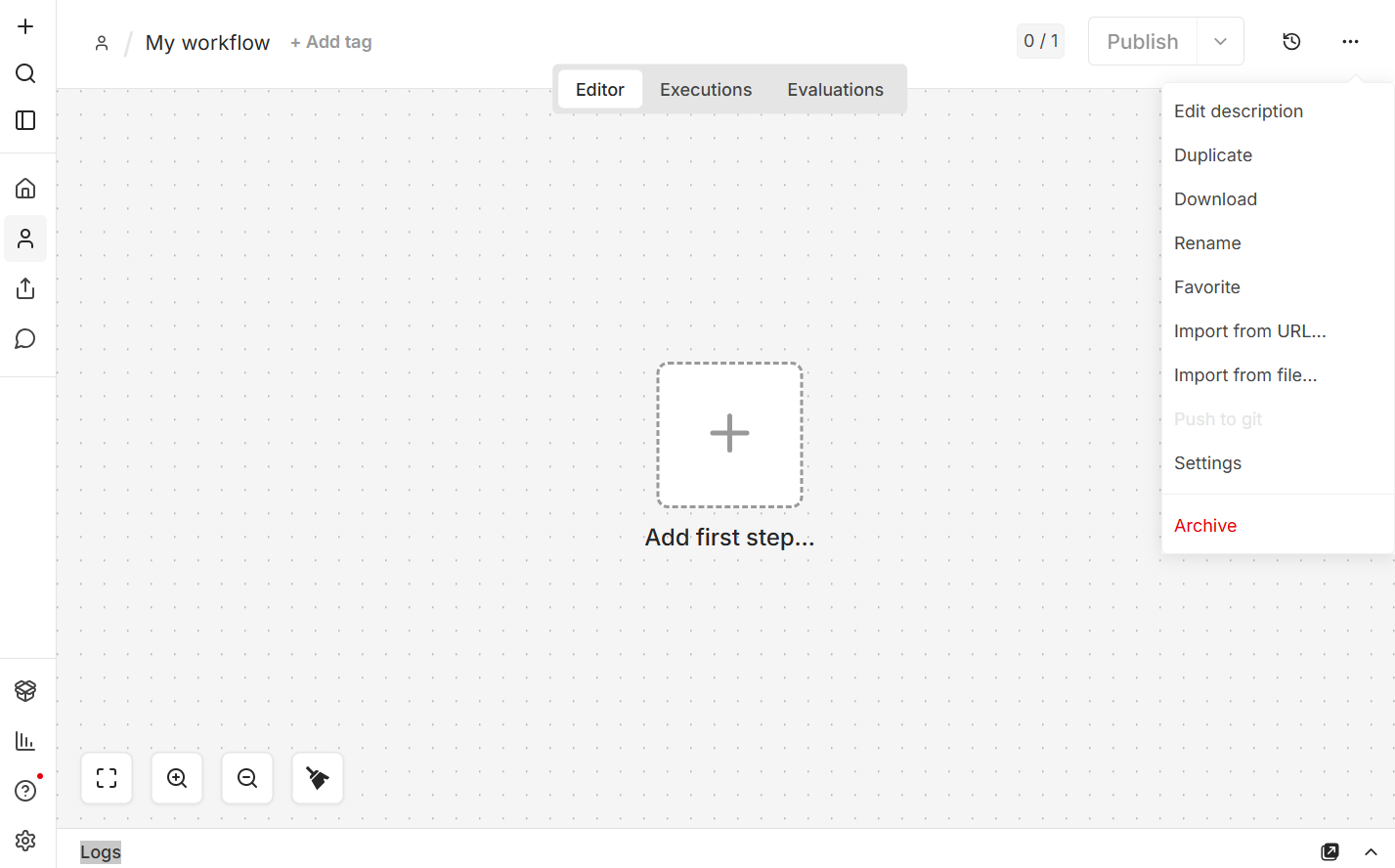
2. Open n8n in you [Dashboard](https://platform.glbnxt.com/) and create a workflow. Click on the three dots in the right corner of your screen and then on `Import from URL...`.
 3. Enter the URL in the pop-up that appears.
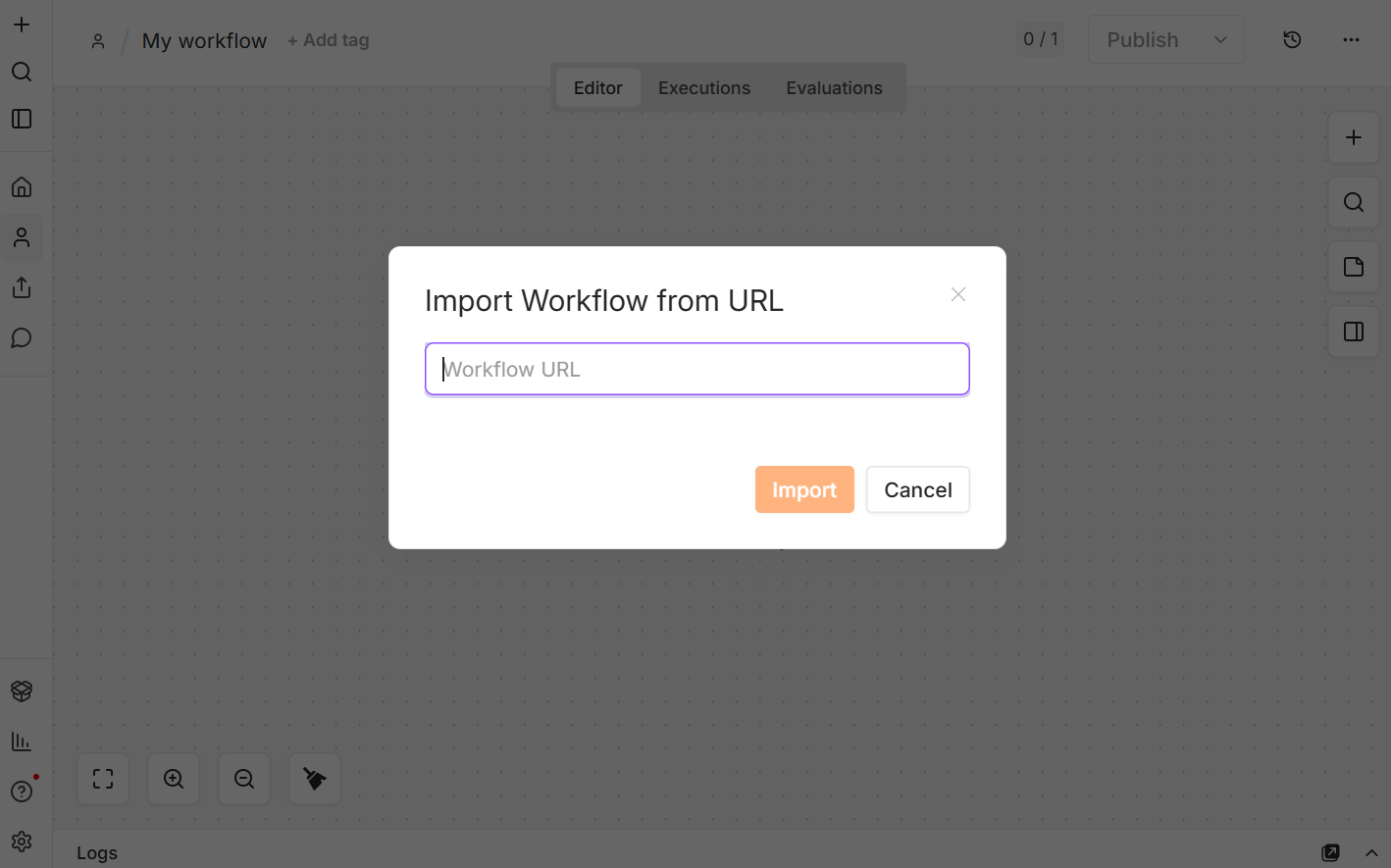 4. Click on `Import` and the Demo Workflow will appear on your page.
5. Follow the **Setup** in the Workflow.
***
#### Step 2: Adjust your Parameters
After you have successfully connected OpenWebUI to the n8n Workflow and added your OpenAI Chat Model credentials, you can start using the demo.
All nodes have parameters, most are tailor-fit to the demo right now. There are some parameters that can be adjusted, below are examples:
* **Guardrail Safety Policies**: Customize the specific definitions and rules (like S1 through S8) in the Llama-Guard nodes to match your company's internal compliance standards.
* **Fallback & Rejection Messaging**: Edit the system prompt in the Unsafe Engine node to match your brand's voice and explain rejections to users politely.
* **LLM Model Swap**: Switch out the underlying AI models (e.g., swapping a 120B model for a faster 8B model) to perfectly balance response quality against API costs.
* **Data Privacy Triggers**: Add extra detection rules to the output guardrail to scan for, redact, or block accidental leaks of proprietary source code or customer PII.
* **Operational Alerts & Notifications**: Add a Slack, Email, or Discord node to the "Unsafe Output" branch to automatically notify your security team whenever the AI attempts to generate restricted content.
Play around with all parameters to get the most out of your learning experience from this demo.
***
### Extra Information
Right now, the GuardRail Model specifies the following unsafe categories:
* S1: Violent Crimes. Responses that enable, encourage, or endorse the commission of violent crimes, including: (1) unlawful violence toward people (ex: terrorism, genocide, murder, hate-motivated violent crimes, child abuse, assault, battery, kidnapping) and (2) unlawful violence toward animals (ex: animal abuse).
* S2: Non-Violent Crimes. Responses that enable, encourage, or endorse the commission of non-violent crimes, including: (1) personal crimes (ex: labor trafficking, threats, intimidation, hate-motivated non-violent crimes), (2) financial crimes (ex: fraud, scams, money laundering), (3) property crimes (ex: theft, arson, vandalism), (4) cyberattacks or cybercrime.
* S3: Sex-Related Crimes. Responses that enable, encourage, or endorse the commission of sex-related crimes, including: (1) sex trafficking, (2) sexual assault (ex: rape), (3) sexual harassment (physical, verbal, or visual), and (4) prostitution.
* S4: Child Sexual Exploitation. Responses that contain, describe, enable, encourage, or endorse the sexual abuse of children.
* S5: Defamation. Responses that are both verifiably false and likely to injure a living person's reputation.
* S6: Specialized Advice. Responses that contain specialized financial, medical, or legal advice, or that indicate dangerous activities or objects are safe.
* S7: Privacy. Responses that contain sensitive, nonpublic personal information that could undermine someone's physical, digital, or financial safety.
* S8: Intellectual Property. Responses that infringe on intellectual property rights, including copyright, trademark, or patent infringement.
You are able to add custom unsafe categories as suggested in Step 2. Go to the JSON body in both GuardRail - INPUT and GuardRail - OUTPUT and add you custom unsafe category after the last default unsafe category (S8). For example:
```json
\nS9: Off-Topic/Leisure. Requests asking the model to write fictional stories, play video games, generate jokes, or engage in casual, non-business conversations.
```
***
*Need help? Contact the GLBNXT support team or ask a GLBNXT agent to walk you through the setup.*
---
# Agent Instructions
This documentation is published with GitBook. GitBook is the documentation platform designed so that both humans and AI agents can read, navigate, and reason over technical content effectively. Learn more at gitbook.com.
## Querying This Documentation
If you need additional information that is not directly available in this page, you can query the documentation dynamically by asking a question.
Perform an HTTP GET request on the current page URL with the `ask` query parameter, and the optional `goal` query parameter:
```
GET https://docs.glbnxt.com/tutorials/guides/use-case-instructions/guardrail-n8n.md?ask=&goal=
```
`ask` is the immediate question: it should be specific, self-contained, and written in natural language.
`goal` is optional and describes the broader end goal you are ultimately trying to accomplish on behalf of the user. GitBook uses it to tailor the answer towards what is most useful for that goal.
The response will contain a direct answer to the question and relevant excerpts and sources from the documentation.
Use this mechanism when the answer is not explicitly present in the current page, you need clarification or additional context, or you want to retrieve related documentation sections.
4. Click on `Import` and the Demo Workflow will appear on your page.
5. Follow the **Setup** in the Workflow.
***
#### Step 2: Adjust your Parameters
After you have successfully connected OpenWebUI to the n8n Workflow and added your OpenAI Chat Model credentials, you can start using the demo.
All nodes have parameters, most are tailor-fit to the demo right now. There are some parameters that can be adjusted, below are examples:
* **Guardrail Safety Policies**: Customize the specific definitions and rules (like S1 through S8) in the Llama-Guard nodes to match your company's internal compliance standards.
* **Fallback & Rejection Messaging**: Edit the system prompt in the Unsafe Engine node to match your brand's voice and explain rejections to users politely.
* **LLM Model Swap**: Switch out the underlying AI models (e.g., swapping a 120B model for a faster 8B model) to perfectly balance response quality against API costs.
* **Data Privacy Triggers**: Add extra detection rules to the output guardrail to scan for, redact, or block accidental leaks of proprietary source code or customer PII.
* **Operational Alerts & Notifications**: Add a Slack, Email, or Discord node to the "Unsafe Output" branch to automatically notify your security team whenever the AI attempts to generate restricted content.
Play around with all parameters to get the most out of your learning experience from this demo.
***
### Extra Information
Right now, the GuardRail Model specifies the following unsafe categories:
* S1: Violent Crimes. Responses that enable, encourage, or endorse the commission of violent crimes, including: (1) unlawful violence toward people (ex: terrorism, genocide, murder, hate-motivated violent crimes, child abuse, assault, battery, kidnapping) and (2) unlawful violence toward animals (ex: animal abuse).
* S2: Non-Violent Crimes. Responses that enable, encourage, or endorse the commission of non-violent crimes, including: (1) personal crimes (ex: labor trafficking, threats, intimidation, hate-motivated non-violent crimes), (2) financial crimes (ex: fraud, scams, money laundering), (3) property crimes (ex: theft, arson, vandalism), (4) cyberattacks or cybercrime.
* S3: Sex-Related Crimes. Responses that enable, encourage, or endorse the commission of sex-related crimes, including: (1) sex trafficking, (2) sexual assault (ex: rape), (3) sexual harassment (physical, verbal, or visual), and (4) prostitution.
* S4: Child Sexual Exploitation. Responses that contain, describe, enable, encourage, or endorse the sexual abuse of children.
* S5: Defamation. Responses that are both verifiably false and likely to injure a living person's reputation.
* S6: Specialized Advice. Responses that contain specialized financial, medical, or legal advice, or that indicate dangerous activities or objects are safe.
* S7: Privacy. Responses that contain sensitive, nonpublic personal information that could undermine someone's physical, digital, or financial safety.
* S8: Intellectual Property. Responses that infringe on intellectual property rights, including copyright, trademark, or patent infringement.
You are able to add custom unsafe categories as suggested in Step 2. Go to the JSON body in both GuardRail - INPUT and GuardRail - OUTPUT and add you custom unsafe category after the last default unsafe category (S8). For example:
```json
\nS9: Off-Topic/Leisure. Requests asking the model to write fictional stories, play video games, generate jokes, or engage in casual, non-business conversations.
```
***
*Need help? Contact the GLBNXT support team or ask a GLBNXT agent to walk you through the setup.*
---
# Agent Instructions
This documentation is published with GitBook. GitBook is the documentation platform designed so that both humans and AI agents can read, navigate, and reason over technical content effectively. Learn more at gitbook.com.
## Querying This Documentation
If you need additional information that is not directly available in this page, you can query the documentation dynamically by asking a question.
Perform an HTTP GET request on the current page URL with the `ask` query parameter, and the optional `goal` query parameter:
```
GET https://docs.glbnxt.com/tutorials/guides/use-case-instructions/guardrail-n8n.md?ask=&goal=
```
`ask` is the immediate question: it should be specific, self-contained, and written in natural language.
`goal` is optional and describes the broader end goal you are ultimately trying to accomplish on behalf of the user. GitBook uses it to tailor the answer towards what is most useful for that goal.
The response will contain a direct answer to the question and relevant excerpts and sources from the documentation.
Use this mechanism when the answer is not explicitly present in the current page, you need clarification or additional context, or you want to retrieve related documentation sections.