> For the complete documentation index, see [llms.txt](https://docs.glbnxt.com/llms.txt). Markdown versions of documentation pages are available by appending `.md` to page URLs; this page is available as [Markdown](https://docs.glbnxt.com/tutorials/guides/coding/cline.md).
# Set up Cline with GLBNXT
### Introduction
Cline is an autonomous AI coding assistant that lives directly in your VS Code sidebar. Unlike traditional "copilots," Cline can use its own terminal, run commands, and browse the web to handle complex engineering tasks from start to finish. By integrating GLBNXT, you can power Cline’s reasoning with the industry's leading models via our high-speed API.
### Prerequisites
* **GLBNXT API Key**: You must have an active developer key. If you haven't created one yet, follow our [Developer Keys Guide](https://docs.glbnxt.com/configure-glbnxt/ai-platform/developer-keys).
* **Cline Installed**: Go to the [Official Cline Site](https://cline.bot/) and install Cline for VS Code or install it directly in the VS Code Extensions Marketplace in VS Code.
### Configuration
After the download is complete, the Cline icon (the head of a robot) will appear on the activity bar of VS Code. Click on this icon and select **Bring my own API key**. Then, set the settings as shown in the next image.
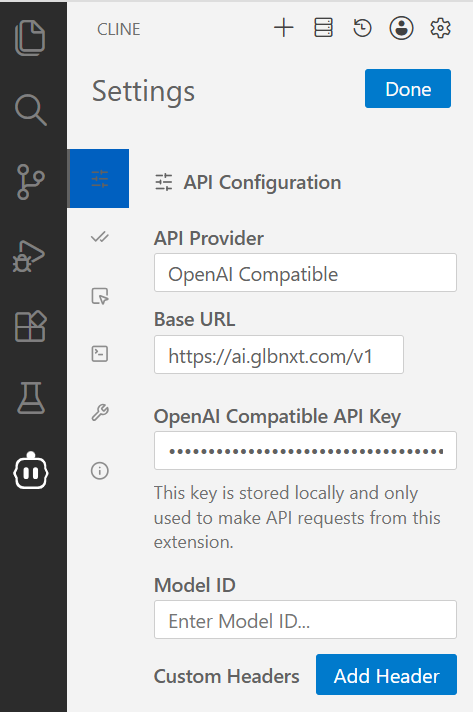 Enter your Model ID with the exact **Model ID** found in the [GLBNXT Model Hub](https://docs.glbnxt.com/configure-glbnxt/ai-platform/model-hub). Cline allows you to enter one model, you are however able to change your selection after the configuration.
It is also possible to use a different model in **Plan Mode** and **Act Mode**. Switching between Plan and Act mode will persist the API and model used in the previous mode. This may be helpful e.g. when using a strong reasoning model to architect a plan for a cheaper coding model to act on. You can apply this by selecting the box **Use different models for Plan and Act modes**.
### Remarks
* Cline uses complex prompts and works best with Claude models. Less capable models may not work as expected.
* Cline offers custom auto-approve options. Selecting the boxes lets Cline take these actions without asking for approval.
Make sure to check the [Official Cline Site](https://cline.bot/) for all options and tips.
### Troubleshooting
* **Model ID Mismatch**: If Cline fails to initialize, double-check that the key in **Model ID** matches the ID in the GLBNXT Model Hub exactly.
For more information reach out to the [Cline Documentation Page](https://docs.cline.bot/home).
---
# Agent Instructions
This documentation is published with GitBook. GitBook is the documentation platform designed so that both humans and AI agents can read, navigate, and reason over technical content effectively. Learn more at gitbook.com.
## Querying This Documentation
If you need additional information that is not directly available in this page, you can query the documentation dynamically by asking a question.
Perform an HTTP GET request on the current page URL with the `ask` query parameter, and the optional `goal` query parameter:
```
GET https://docs.glbnxt.com/tutorials/guides/coding/cline.md?ask=&goal=
```
`ask` is the immediate question: it should be specific, self-contained, and written in natural language.
`goal` is optional and describes the broader end goal you are ultimately trying to accomplish on behalf of the user. GitBook uses it to tailor the answer towards what is most useful for that goal.
The response will contain a direct answer to the question and relevant excerpts and sources from the documentation.
Use this mechanism when the answer is not explicitly present in the current page, you need clarification or additional context, or you want to retrieve related documentation sections.
Enter your Model ID with the exact **Model ID** found in the [GLBNXT Model Hub](https://docs.glbnxt.com/configure-glbnxt/ai-platform/model-hub). Cline allows you to enter one model, you are however able to change your selection after the configuration.
It is also possible to use a different model in **Plan Mode** and **Act Mode**. Switching between Plan and Act mode will persist the API and model used in the previous mode. This may be helpful e.g. when using a strong reasoning model to architect a plan for a cheaper coding model to act on. You can apply this by selecting the box **Use different models for Plan and Act modes**.
### Remarks
* Cline uses complex prompts and works best with Claude models. Less capable models may not work as expected.
* Cline offers custom auto-approve options. Selecting the boxes lets Cline take these actions without asking for approval.
Make sure to check the [Official Cline Site](https://cline.bot/) for all options and tips.
### Troubleshooting
* **Model ID Mismatch**: If Cline fails to initialize, double-check that the key in **Model ID** matches the ID in the GLBNXT Model Hub exactly.
For more information reach out to the [Cline Documentation Page](https://docs.cline.bot/home).
---
# Agent Instructions
This documentation is published with GitBook. GitBook is the documentation platform designed so that both humans and AI agents can read, navigate, and reason over technical content effectively. Learn more at gitbook.com.
## Querying This Documentation
If you need additional information that is not directly available in this page, you can query the documentation dynamically by asking a question.
Perform an HTTP GET request on the current page URL with the `ask` query parameter, and the optional `goal` query parameter:
```
GET https://docs.glbnxt.com/tutorials/guides/coding/cline.md?ask=&goal=
```
`ask` is the immediate question: it should be specific, self-contained, and written in natural language.
`goal` is optional and describes the broader end goal you are ultimately trying to accomplish on behalf of the user. GitBook uses it to tailor the answer towards what is most useful for that goal.
The response will contain a direct answer to the question and relevant excerpts and sources from the documentation.
Use this mechanism when the answer is not explicitly present in the current page, you need clarification or additional context, or you want to retrieve related documentation sections.