> For the complete documentation index, see [llms.txt](https://docs.glbnxt.com/llms.txt). Markdown versions of documentation pages are available by appending `.md` to page URLs; this page is available as [Markdown](https://docs.glbnxt.com/configure-glbnxt/ai-platform/guardrails.md).
# Guardrails
{% hint style="info" icon="user-lock" %}
**Role-based access**
What each role can do on this page. Roles are assigned in [User management](/configure-glbnxt/platform-configuration/user-management.md).
| Administrator | Moderator | User |
| ---------------------------------------------- | ------------------------------------- | ----------------------------------------- |
| :check: Read and write | :eye: Read only | :xmark: No access |
| {% endhint %} | | |
***
Every request your organisation sends to a model is checked before it leaves the platform. By default, personal details, identity numbers, payment and bank details, and credentials are replaced by a placeholder, and the rest of the request reaches the model unchanged.
The **Guardrails** page shows what the platform removes from your requests. You can test it with your own text and, as an administrator, switch individual protections off or on.
The protections are on by default and run for every request, whether or not anyone opens this page. For a general introduction to guardrails, see [Guardrails](https://docs.glbnxt.com/platform/security-and-compliance/guardrails) in the Platform documentation.
### What gets checked
* **Only the request is checked.** Answers from the model are not.
* **Matched values are masked, never blocked.** An email address becomes `[EMAIL_REDACTED]`, and the request continues.
* **Settings apply to the whole organisation.** When an administrator switches a protection off, it is off for every request your organisation sends, not only their own.
* **The check does not store your text.** It runs on GLBNXT's own servers.
To open the page, go to **AI Platform › Guardrails**. It has two tabs that this guide covers: **Guardrail bench** and **GLBNXT Protection**. The bench opens first.
### Test your text on the Guardrail bench
The bench shows exactly what a model would receive. Nothing is sent to a model, and your text is not stored.
1. Open the **Guardrail bench** tab.
2. Paste a request you would send to a model, up to 4,000 characters. To start from an example instead, choose one of the buttons under **Test with our examples**: **Personal details**, **Identity and tax numbers** or **Finances and credentials**. Each fills the box with a fictional text.
3. Choose **Test**.
The bench shows your text with every matched value replaced by a placeholder. The legend below the box highlights which protections matched. If nothing matched, you see **No matches found.**
The bench uses the protections that are currently on for your organisation. A protection that is switched off does not mask anything on the bench either.
To start again, choose **Reset**.
**About placeholders.** A placeholder is named after the format that matched, not after the protection. One protection can therefore produce different placeholders. Phone numbers in different national formats, for example, get different placeholders, such as `[NL_PHONE_REDACTED]`.
### The protections
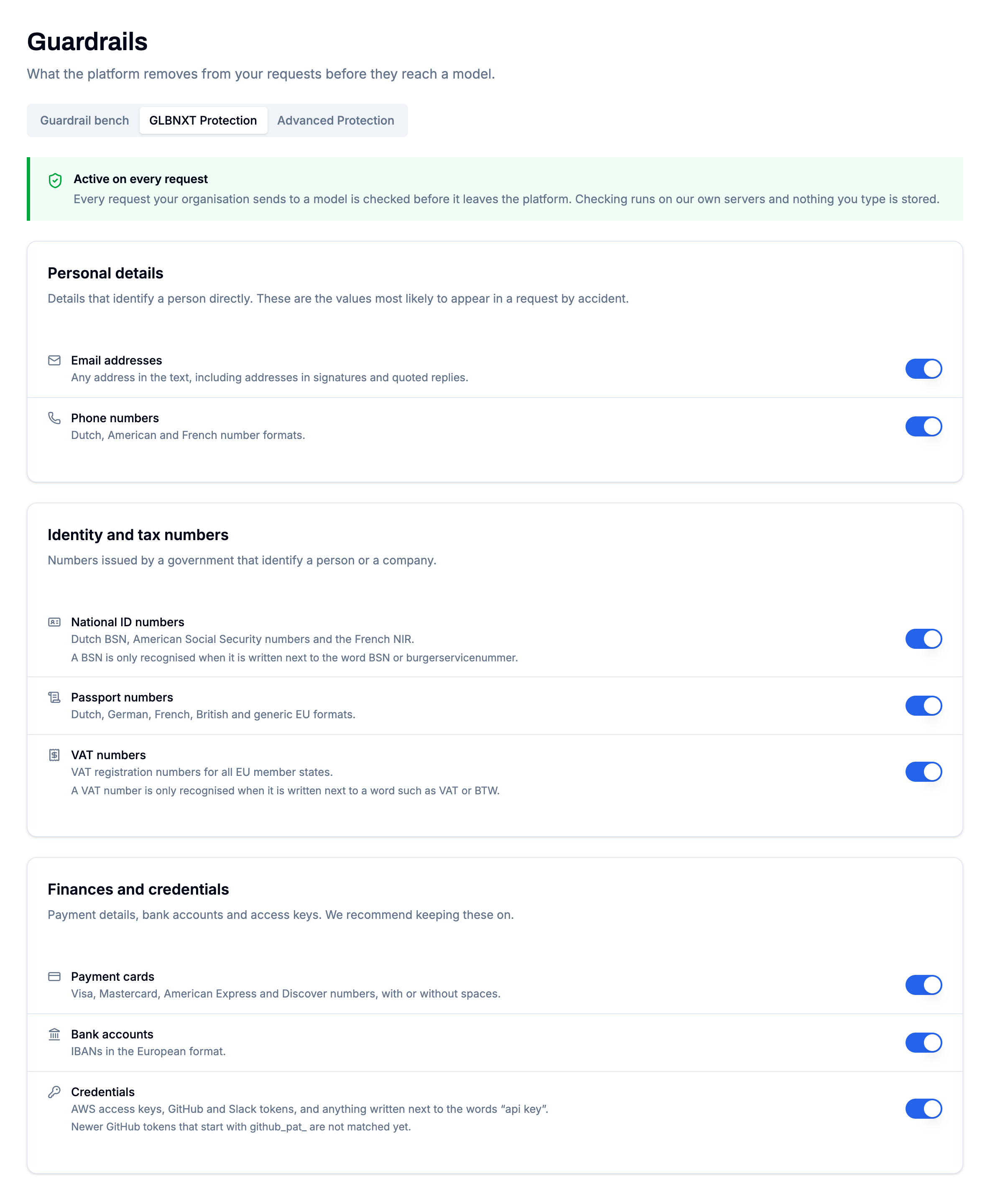
Open the **GLBNXT Protection** tab to see all protections. The notice **Active on every request** at the top confirms that your requests are checked.
There are eight protections in three groups. Every protection masks, and every protection is on by default.
#### Personal details
Details that identify a person directly. These are the values most likely to appear in a request by accident.
* **Email addresses**: any email address in the text, including addresses in signatures and quoted replies.
* **Phone numbers**: phone numbers in national and international formats.
#### Identity and tax numbers
Numbers issued by a government that identify a person or a company.
* **National ID numbers**: citizen service numbers, social security numbers and other national identification numbers.
* **Passport numbers**: passport numbers in national and international formats.
* **VAT numbers**: VAT registration numbers of companies.
#### Finances and credentials
Payment details, bank accounts and access keys. We recommend keeping these on.
* **Payment cards**: credit and debit card numbers, with or without spaces.
* **Bank accounts**: bank account numbers, such as IBANs.
* **Credentials**: access keys, API keys and tokens that give access to other systems and services.
Moderators see each protection marked **On** or **Off**. Administrators see a switch.
### Switch a protection off or on
{% hint style="warning" %}
A protection that is switched off is off for every request your organisation sends. The values it covers reach the model exactly as written.
{% endhint %}
**To switch a protection off:**
1. On the **GLBNXT Protection** tab, turn off the switch next to the protection.
2. Read the confirmation, for example **Switch off email addresses?**
3. Choose **Switch off**.
For payment cards, bank accounts and credentials, the confirmation recommends keeping the protection on. Choose **Switch off anyway** to continue, or **Keep it on** to cancel.
**To switch a protection on:** turn on its switch. The change takes effect straight away, without a confirmation.
### Changes in the audit log
Every switch is recorded in your organisation's [Audit Logs](/configure-glbnxt/platform-configuration/compliance/audit-logs.md) as **Protection Switched On** or **Protection Switched Off**, with the name of the protection, for example *Email addresses*.
### Limitations
* **Detection is not 100% guaranteed.** Guardrails recognise sensitive information by its usual format. A value written in an unusual way can reach the model unmasked.
* **Formatting affects detection.** Spaces, separators, line breaks and the words around a value all influence whether it is recognised. Some numbers are only recognised when a word that names them is written nearby.
* **Harmless values can be masked too.** An invoice or order number with the shape of a phone number, for example, is replaced like a real one.
* **A masked value does not reach the model.** A request that depends on that value, such as "check this IBAN", does not work while the protection is on.
* **Only the request is checked.** Answers from the model are not.
* **Settings apply to the whole organisation.** Protections cannot be set per user or per application.
Use the Guardrail bench to see what happens to a specific text.
---
# Agent Instructions
This documentation is published with GitBook. GitBook is the documentation platform designed so that both humans and AI agents can read, navigate, and reason over technical content effectively. Learn more at gitbook.com.
## Querying This Documentation
If you need additional information that is not directly available in this page, you can query the documentation by asking a question.
Perform an HTTP GET request on the following URL with the `ask` and `goal` query parameters:
```
GET https://docs.glbnxt.com/configure-glbnxt/ai-platform/guardrails.md?ask=&goal=
```
`ask` is the immediate question: it should be specific, self-contained, and written in natural language.
`goal` is what the user is ultimately trying to achieve, the reason they need the answer. Sharing it helps GitBook give you a better, more relevant answer. A goal is most helpful when it describes the outcome the user wants rather than restating the question. For example, with `ask=how do I create an API token`, a goal like `automate deployments from our CI pipeline` lets GitBook tailor the answer to that use case.
The response will contain a direct answer to the question and relevant excerpts and sources from the documentation.
Use this mechanism when the answer is not explicitly present in the current page, you need clarification or additional context, or you want to retrieve related documentation sections.